


Spin - Electric Scooters
4.715.23K Reviews
App Specs
- Version
- 4.412.1.3
- Updated On
- License
- Free
- Downloads
- 1,000,000+
- Developer
- Pheenix USH LLC
- Categories
- Travel & Local
- Platform
- Android, iOS
Screenshots
 Analysis by AppCompare
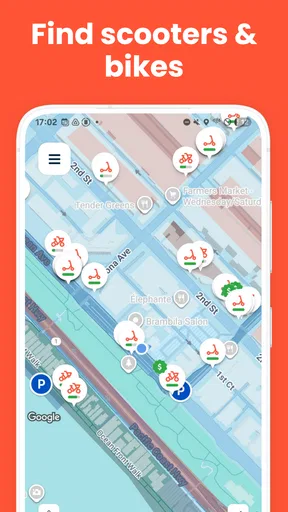
If you are about to try shared electric scooters for the first time, Spin is designed around a simple idea: find an available scooter, unlock it, ride to a useful destination, and finish the trip in the app. I found that straightforward approach more valuable than a crowded feature set. The app sits in the Travel & Local category, and its focus is clear from the moment you open it: getting you from one nearby place to another without taking a car for every short journey.
Spin is a free app from Pheenix USH LLC for people who want access to shared electric scooters rather than ownership of a vehicle. It is suitable for Everyone, and it has been available since May 28, 2017. The current version is 4.411.0.3 and it requires an operating system version of 9 or later. Those details matter if you are installing it on an older phone, but the more important question is whether shared scooters fit your normal trips.
In my experience, this is most useful for the awkward distances that are too long to walk comfortably but too short to justify driving. It can also make a public-transport journey more practical when the final stretch is inconvenient. I would not treat it as a replacement for every commute, though. Weather, traffic, local availability, and where you can legally finish the ride all affect the experience.
What to expect before your first ride
The first thing to understand is that the app is only one part of the service. It helps you locate and use a shared scooter, but the quality of the trip depends on what is available around you and whether your destination is suitable for ending the ride. A scooter that appears close on the map may still be on the other side of a busy road, behind a building, or in a place that is less convenient than the map initially suggests.
I recommend opening Spin before you are already late. Give yourself a few minutes to look at the nearby options, walk to one safely, and check the surroundings rather than choosing purely by distance. That small habit avoids one of the most common beginner frustrations: reaching the pin and discovering that the scooter is not immediately visible or that the approach is awkward.
The app has earned a 4.7 average from around 51 thousand ratings, with roughly 15 thousand written reviews and more than a million installs. I see those figures as evidence that the basic scooter workflow is familiar to many people, not as a guarantee that every local ride will be perfect. Shared mobility is naturally affected by the city, the time of day, and the condition and placement of individual vehicles.
Before setting off, think about the trip itself. A short ride to a café, a station, a class, or a nearby appointment is a better first test than an ambitious cross-town journey. You are learning both the app and the practical rules of riding in your area. A simple destination gives you room to notice how unlocking works, how the ride is ended, and what the map expects from you.
Worth Reading Before You Choose

EA SPORTS FC Mobile 26 Is a Bigger Football Game, but It Takes Time

Flipboard Shows What News Apps Must Do Beyond the Feed

Switching to Android Auto Means Rethinking Your Driving Routine

Google Calendar Makes a Crowded Week Easier to Manage

Ludo King Makes the Most of the Minutes Between Plans

Baby Panda World Brings Quick Play to Modern Phones, but Its Game Library Feels Busy
Install, open, and prepare without rushing
After installing the app, I would start by making sure the phone has a dependable connection and enough battery for the whole outing. The app needs to communicate with the service while you locate and use a scooter, so a nearly dead phone is a poor starting point. I also prefer to have the destination in mind before unlocking. That keeps the first ride focused instead of turning it into an improvised search.
The opening experience is easier if you treat the map as a planning tool rather than a promise that a vehicle is waiting exactly where the icon appears. Look around the selected area when you arrive. Check the pavement, entrances, parked vehicles, and nearby traffic. If the scooter is not obvious, pause and search carefully instead of unlocking a different one at random.
For a first-time user, the important setup decision is not choosing the fastest route. It is choosing a manageable route. I like to select a destination that leaves a clear final walking option, because the best drop-off point is not always the exact entrance I originally had in mind. A little flexibility makes the service feel much less stressful.
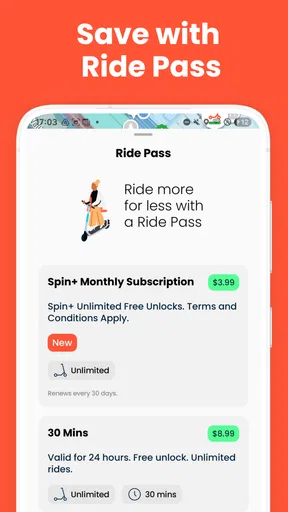
Spin is free to download, but that should not be confused with every ride being free. The app provides access to the service; the cost of an individual trip is something you should review in the ride flow before committing. I always check the displayed ride information before unlocking, especially when I am comparing a scooter with walking, public transport, or a conventional taxi.
How I approach the first successful action
The first meaningful success is not merely finding a scooter. It is completing a short trip and ending it correctly. I suggest choosing a familiar route where you already know the streets and can concentrate on the controls and surroundings. Keep the first ride deliberately simple: locate the vehicle, unlock it through the app, move at a comfortable pace, and stop somewhere appropriate for the service.
Do not begin by testing the scooter in a crowded area. If you are inexperienced, a quiet and open starting space gives you time to understand how it responds. I would also avoid carrying complicated luggage or trying to use the phone while moving. The app should be handled before the ride, and the phone should be put away once you are underway.
One useful workflow is to decide your stopping area before you start. When you are close to the destination, slow down and inspect where the scooter can be left. A convenient doorway is not automatically a suitable parking place. You may need to walk the final part, and that is normal. Ending the trip thoughtfully is part of using shared mobility well, not a sign that the ride failed.
Once stopped, follow the app’s instructions to finish the ride and take a moment to confirm that the trip has actually ended. This is one of the most important habits I can recommend. Beginners often focus so much on reaching the destination that they forget the final in-app step. I would never put the phone away until the app clearly reflects that the ride is complete.
Small habits that make the service easier
A useful but easily overlooked tactic is to plan the return journey separately. A scooter may be ideal for reaching a place, yet unavailable when you are ready to leave. If your appointment is time-sensitive, check whether walking or public transport can cover the return. Spin works best when it is one flexible part of a journey, not the only plan you are willing to use.
Another practical habit is to compare the scooter with the final walking distance, not just the distance from your current location. A vehicle that is slightly farther away but positioned near a clear route can be better than one that appears close but leaves you navigating an inconvenient street or entrance. The map helps you find options, but your local knowledge still matters.
I also recommend treating the battery indicator and vehicle condition as part of your decision whenever the app shows relevant information. For a short trip, you may have several reasonable choices. Selecting the scooter that looks more suitable for the intended distance is wiser than automatically taking the nearest one. This is especially important when you do not have time to change plans halfway through.
Finally, keep your first few rides short enough that you can learn the rhythm of the service. You will become more comfortable with where scooters tend to appear, how long it takes to reach them, and which destinations are easy to finish at. That local pattern is more useful than memorizing a single route.
Common confusion and where Spin can disappoint
The most common misunderstanding is expecting the app to behave like a car-hailing service, where a vehicle is brought to you and the exact destination is always straightforward. Shared scooters are already positioned around the area, so availability is uneven. The app can help you search, but it cannot remove the walking part before the ride or guarantee that the nearest option is the most practical one.
Another point of confusion is the difference between seeing a scooter on the map and being ready to ride it. The map is a guide, not a substitute for checking the physical location. Buildings, private areas, entrances, and busy roads can make a short map distance feel much longer. I have found that allowing extra time for the approach makes the entire experience calmer.
Parking is also more important than many new users expect. Reaching your destination does not mean you can leave the scooter wherever it is most convenient for you. Think about pedestrians, entrances, accessibility, and the surrounding street before ending the trip. If the area feels unsuitable, walk a little farther and look for a better place. That extra minute can prevent an unpleasant finish and keeps the service usable for others.
Weather is a genuine limitation. A scooter can look perfect for a five-minute trip when the sky is clear, but the same journey may be uncomfortable or unsafe in rain, strong wind, or poor visibility. I would choose walking or public transport when conditions make balance, braking, or visibility more difficult. The app is convenient, but convenience should not override basic judgment.
There is also a learning curve if you are used to walking or driving. Walking gives you complete control over the route and requires no unlocking step. Driving offers more protection from weather and lets you carry more, although it brings parking and traffic problems. Public transport is often better for longer journeys or predictable schedules. Spin fills a narrower gap: short, flexible trips where a scooter is available and the road environment feels comfortable.
For families, the Everyone age classification describes the app’s content, not a blanket answer about who should ride. A parent or guardian should consider local riding rules, the rider’s experience, and the physical environment. I would not hand the phone to a beginner and assume the app alone provides enough preparation. The real responsibility remains with the person using the scooter.
Some users should skip this app altogether. If you need a guaranteed vehicle at a fixed time, regularly carry bulky items, dislike riding near traffic, or live and travel in places where scooters are rarely available, a bus, train, taxi, or walking route may serve you better. Spin is most convincing when flexibility matters more than certainty.
How it compares with ordinary alternatives
Compared with walking, Spin saves time on suitable short routes and can reduce the effort of hills or a tight schedule. Walking still wins when the destination is close, the weather is pleasant, or the route is crowded enough that riding would add stress. I often see the scooter as a way to preserve energy for the part of the day that matters, rather than as an automatic upgrade over walking.
Compared with public transport, the app offers a more direct trip and avoids waiting for a vehicle. Public transport is usually stronger for longer distances, bad weather, and journeys where you need a dependable timetable. A scooter can be the missing first or last connection, but I would not assume it replaces a reliable transit network.
Compared with a taxi or ride-hailing service, Spin can feel more independent and better suited to a quick local errand. You find the vehicle yourself and ride it yourself, so there is no driver to wait for. The trade-off is that you handle traffic, weather, navigation, parking, and the physical demands of riding. That exchange is worthwhile for some trips and clearly wrong for others.
Compared with owning a bicycle or scooter, shared access avoids storage and maintenance responsibilities. The downside is that you cannot count on your preferred vehicle being nearby or available. Ownership is better for someone who rides the same route daily and wants predictable access; Spin is better for occasional, spontaneous, or one-way urban trips.
My practical verdict for a first-time user
After trying to view the app from a beginner’s perspective, I think Spin succeeds because its main task is easy to understand: use the map to find a shared electric scooter and make a short journey. The free app, broad availability reflected by more than a million installs, and clear travel focus make it approachable for someone testing scooter sharing for the first time.
Its weaknesses are not hidden behind the interface. Availability can be inconvenient, a map location may require more searching than expected, and ending a ride responsibly takes attention. You also need a backup plan when weather, traffic, or a missing scooter changes the situation. Those are limitations of the shared-scooter model as much as limitations of the app itself, but they still affect whether Spin is right for you.
My recommended first attempt would be a short daytime trip to a familiar place. Check the ride information before unlocking, walk carefully to the selected scooter, practice your route mentally, and choose a sensible stopping area before you start. When you arrive, complete the ending process in the app and confirm that it has finished. That sequence turns the service from an unfamiliar map into a useful everyday tool.
For occasional urban travel, last-mile connections, and quick errands, I would recommend giving Spin a try. I would not recommend relying on it as your only transport or assuming every trip will be as smooth as the ideal example. The app is at its best when you use it with a little planning and realistic expectations. If that matches the way you travel, the simple promise behind Spin can be genuinely practical: a flexible ride waiting somewhere nearby when walking feels too slow and driving feels excessive.
Pros
- Quickly locates nearby scooters through the live map.
- Unlocking and payment are handled directly in the app.
- Trip history helps track rides and past charges.
- Ride zones and parking guidance reduce navigation confusion.
- Available vehicles can be reserved briefly before pickup.
Cons
- Scooter availability can vary significantly by neighborhood.
- Battery levels may be too low for longer journeys.
- Pricing can increase during busy periods or special events.
- Parking restrictions may make ending a ride inconvenient.
- The app requires location access and a reliable mobile connection.
FAQs for Spin - Electric Scooters
What is Spin – Electric Scooters, and how does it work?
Spin is a shared electric scooter service that lets you locate, unlock, ride, and pay for scooters through its mobile app. After creating an account, you can view nearby available vehicles on the map, scan the scooter’s QR code, and begin your trip. The app also shows riding instructions, pricing information, and designated parking guidance before and during your journey.
How much does it cost to ride a Spin scooter?
Spin’s pricing can vary depending on your city, local regulations, promotions, membership plans, and the length of your ride. In most locations, users pay an unlocking fee followed by a per-minute rate, although taxes or other charges may apply. It is important to check the fare displayed in the app before unlocking, since prices and available passes may change.
Do I need a driver’s license or any special equipment to use Spin?
Requirements depend on the city where you ride, but users generally need to meet Spin’s minimum age requirement and accept the service’s terms. A driver’s license is not always required, although local laws may differ. Wearing a properly fitted helmet is strongly recommended and may be legally required in some areas. Always review the in-app safety information before riding.
Where can I ride and park a Spin scooter?
Spin scooters are intended for permitted public roads, bike lanes, and other areas approved by local authorities. The app normally identifies service zones, no-ride areas, slow-speed zones, and locations where parking is restricted. At the end of your trip, park responsibly without blocking sidewalks, entrances, ramps, transit stops, or accessibility paths. You may need to take a parking photo before ending the ride.
What should I do if a Spin scooter is damaged or I have a problem during a ride?
Inspect the scooter before starting and report visible damage, safety concerns, or mechanical problems through the app whenever possible. If the vehicle becomes unsafe while you are riding, stop in a secure location and contact Spin support rather than continuing. The app’s help section can also assist with payment questions, ride-ending issues, misplaced scooters, account problems, and reporting improper parking.


